TUTORIAL · June 4, 2026 · 8 min read
Human-in-the-Loop AG-UI Agents in Angular
Build a human-in-the-loop AG-UI agent in Angular — the same chat-approval-card composition from the LangGraph version, wired to an AG-UI-fronted LangGraph backend via @threadplane/ag-ui.
This is how to pause an AG-UI agent in Angular for human approval before it runs a high-stakes tool, using a CUSTOM on_interrupt event and the <chat-approval-card> composition from @threadplane/chat. The example is the same refund agent from Human-in-the-Loop LangGraph Agents in Angular — wired through the AG-UI adapter instead. The Angular component is byte-identical except the import.
Everything below is running code from the cockpit example at cockpit/ag-ui/interrupts. Clone the repo, run nx serve cockpit-ag-ui-interrupts-angular, and follow along.
Goals
- Wire the same refund-approval gate over the AG-UI protocol instead of the LangGraph SDK.
- See how a single
CUSTOMevent namedon_interruptbecomesagent.interrupt()in Angular. - Swap adapters without touching the component — the parity proof.
The parity proof
The Angular component file is byte-identical to the LangGraph version from the precedent post except for the injectAgent import:
- import { injectAgent } from '@threadplane/langgraph';
+ import { injectAgent } from '@threadplane/ag-ui';
The app.config.ts adapter swap is one line in the providers array:
- provideAgent({ apiUrl: '/api', assistantId: 'interrupts' }),
+ provideAgent({ url: '/agent' }),
That's the whole client-side delta. The rest of the file — the template binding <chat-approval-card>, the (action) handler, the approve / edit / cancel branches, the submit({ resume }) call — is unchanged.
<chat-approval-card> reads agent.interrupt() (a Signal<AgentInterrupt | undefined>), and submit({ resume }) is part of the runtime-neutral Agent contract declared in @threadplane/chat. Both adapters populate the signal and forward the resume; the chat surface above doesn't see the wire format.
When should you use an interrupt?
Most tool calls don't need approval. Reads, searches, and lookups can run unattended. Reach for an interrupt when a tool does something the operator wouldn't want to undo by hand: moves money, sends a customer-facing message, deletes a record, or triggers a deploy.
Two practical reasons hold up: it caps the cost of a misfiring agent looping over a write API, and it gives the operator a checkpoint to catch a wrong action before it lands.
The AG-UI angle adds a third. Because AG-UI normalizes the wire across many backends, the same operator-approval checkpoint plugs into LangGraph, CrewAI, Mastra, Pydantic AI, or anything else that speaks AG-UI — with no UI rewrite. If your shop runs more than one agent backend, that's a real benefit. The <chat-approval-card> you build today survives the backend you swap in next year.
The architecture
Three pieces:
- AG-UI-fronted LangGraph backend. The same compiled graph as the LangGraph post, duplicated under
cockpit/ag-ui/interrupts/pythonbecause cockpit examples are standalone. Wrapped withag-ui-langgraph'sLangGraphAgent(name, graph)+add_langgraph_fastapi_endpoint(app, agent, path='/agent')and served byuvicorn. Wheninterrupt()fires inside the graph,ag-ui-langgraphemits aCUSTOMAG-UI event withname: 'on_interrupt'and avaluecarrying the interrupt payload — serialized as a JSON string viadump_json_safe. The uvicorn server needs aMemorySavercheckpointer (langgraph devand LangGraph Platform inject one automatically; plain uvicorn does not, andaget_stateraises "No checkpointer set" without it). @threadplane/ag-uiadapter. The reducer recognizes theCUSTOM/on_interruptevent, JSON-parses the stringvalueso consumers see the structured object, and setsagent.interrupt()to{ id, value, resumable: true }.agent.submit({ resume })short-circuits the message-append path and callssource.runAgent({ forwardedProps: { command: { resume } } }). The server readsforwarded_props.command.resume. The adapter exposes the sameAgentcontract as@threadplane/langgraph.@threadplane/chatUI.<chat-approval-card matchKind="refund_approval">readsagent.interrupt(), opens a<dialog>-backed modal, and emits'approve' | 'edit' | 'cancel'. Resume actions callagent.submit({ resume: { approved, amount? } }). Reject callssubmit({ resume: { approved: false } }). The component doesn't know which adapter is wired. That's the point.
The data flow on resume:
<chat-approval-card> (action: approve)
  → agent.submit({ resume: { approved: true, amount: 99.00 } })
    → source.runAgent({ forwardedProps: { command: { resume: { approved, amount } } } })
      → POST /agent (body carries forwarded_props.command.resume)
        → ag-ui-langgraph: Command(resume=value) → graph continues
On the LangGraph adapter, the same submit({ resume }) becomes a native Client.submit(thread, command={resume:…}) call. Different wire, same Angular surface.
Scaffold
Four steps.
A structured-output call populates the fields the approval card displays. Then request_approval pauses with interrupt():
# graph.py — cockpit/ag-ui/interrupts/python/src/graph.py
class RefundDraft(BaseModel):
    """Structured fields the agent extracts from the refund request."""

    customer_id: str = Field(description="The customer identifier, e.g. cus_a8x2k. Use 'unknown' if not stated.")
    amount: float = Field(description="The refund amount in USD. Use 0 if not stated.")
    reason: str = Field(description="One sentence describing why the refund is justified.")

llm = ChatOpenAI(model="gpt-5-mini", streaming=True)
extractor = ChatOpenAI(model="gpt-5-mini").with_structured_output(RefundDraft)

async def draft_refund(state: RefundState) -> dict:
    draft = await extractor.ainvoke(
        [
            SystemMessage(content="Extract the refund fields from the conversation."),
            *state["messages"],
        ]
    )
    response = await llm.ainvoke([SystemMessage(content=system_prompt)] + state["messages"])
    return {
        "messages": [response],
        "customer_id": draft.customer_id,
        "amount": draft.amount,
        "reason": draft.reason,
    }

def request_approval(state: RefundState) -> dict:
    """Pause for human approval. Resume value is { approved: bool, amount?: number }."""
    amount = state.get("amount") or 0.0
    customer_id = state.get("customer_id") or "unknown"
    reason = state.get("reason") or ""

    decision = interrupt({
        "kind": "refund_approval",
        "amount": amount,
        "customer_id": customer_id,
        "reason": reason,
    })

    if not isinstance(decision, dict) or not decision.get("approved"):
        return {
            "decision_approved": False,
            "messages": [AIMessage(content="Refund cancelled by operator. No charge issued.")],
        }

    edited_amount = decision.get("amount")
    final_amount = float(edited_amount) if edited_amount is not None else amount
    return {
        "decision_approved": True,
        "amount": final_amount,
    }
This file is duplicated into cockpit/ag-ui/interrupts/python/src/graph.py per the cockpit standalone-examples convention — copy, don't import across examples. The graph itself doesn't know it'll be served over AG-UI.
ag-ui-langgraph translates LangGraph runtime events into AG-UI protocol events and mounts a FastAPI endpoint. We add a /ok route for the e2e harness's readiness check:
# server.py — cockpit/ag-ui/interrupts/python/src/server.py
# SPDX-License-Identifier: MIT
from fastapi import FastAPI
from ag_ui_langgraph import LangGraphAgent, add_langgraph_fastapi_endpoint
from .graph import graph

agent = LangGraphAgent(name="interrupts", graph=graph)
app = FastAPI(title="cockpit-ag-ui-interrupts")
add_langgraph_fastapi_endpoint(app, agent, path="/agent")


@app.get("/ok")
def ok() -> dict:
    return {"ok": True}
Run with uv run uvicorn src.server:app --port 5320.
Two details worth knowing:
MemorySaveris mandatory here.ag-ui-langgraphcallsgraph.aget_state(config)to read the post-stream interrupt state.langgraph devand LangGraph Platform inject a checkpointer; plain uvicorn does not. Without one,aget_stateraises "No checkpointer set" and the run never surfaces the interrupt.- The
dump_json_safequirk. Wheninterrupt({…})fires,ag-ui-langgraphserializesvalueto a JSON string before placing it on the wire so arbitrary Python objects survive JSON-encoding. The@threadplane/ag-uireducer parses it back to an object for you, so the Angular side never sees the string.
// app.config.ts — cockpit/ag-ui/interrupts/angular/src/app/app.config.ts
// SPDX-License-Identifier: MIT
import { ApplicationConfig } from '@angular/core';
import { provideAgent } from '@threadplane/ag-ui';
import { provideChat } from '@threadplane/chat';

export const appConfig: ApplicationConfig = {
  providers: [
    provideAgent({ url: '/agent' }),
    provideChat({}),
  ],
};
The Angular dev server proxies /agent to the uvicorn port from cockpit/ports.mjs:
// proxy.conf.mjs — cockpit/ag-ui/interrupts/angular/proxy.conf.mjs
import { portsFor } from '../../../../cockpit/ports.mjs';
const { langgraph: backend } = portsFor('cockpit-ag-ui-interrupts-angular');
export default {
  '/agent': { target: `http://localhost:${backend}`, secure: false, changeOrigin: true, ws: true },
};
AG-UI's provideAgent({ url }) and LangGraph's provideAgent({ apiUrl, assistantId }) share the symmetric provider name but take different config shapes because the wire protocols differ. The provider+inject names are deliberately symmetric across both adapters — that's what makes the component code unchanged.
// interrupts.component.ts — cockpit/ag-ui/interrupts/angular/src/app/interrupts.component.ts
// SPDX-License-Identifier: MIT
import { Component, ChangeDetectionStrategy, signal } from '@angular/core';
import { ChatComponent, ChatApprovalCardComponent, ChatWelcomeSuggestionComponent, type ChatApprovalAction } from '@threadplane/chat';
import { injectAgent } from '@threadplane/ag-ui';
import { ExampleChatLayoutComponent } from '@threadplane/example-layouts';
import { CurrencyPipe } from '@angular/common';

const WELCOME_SUGGESTIONS = [
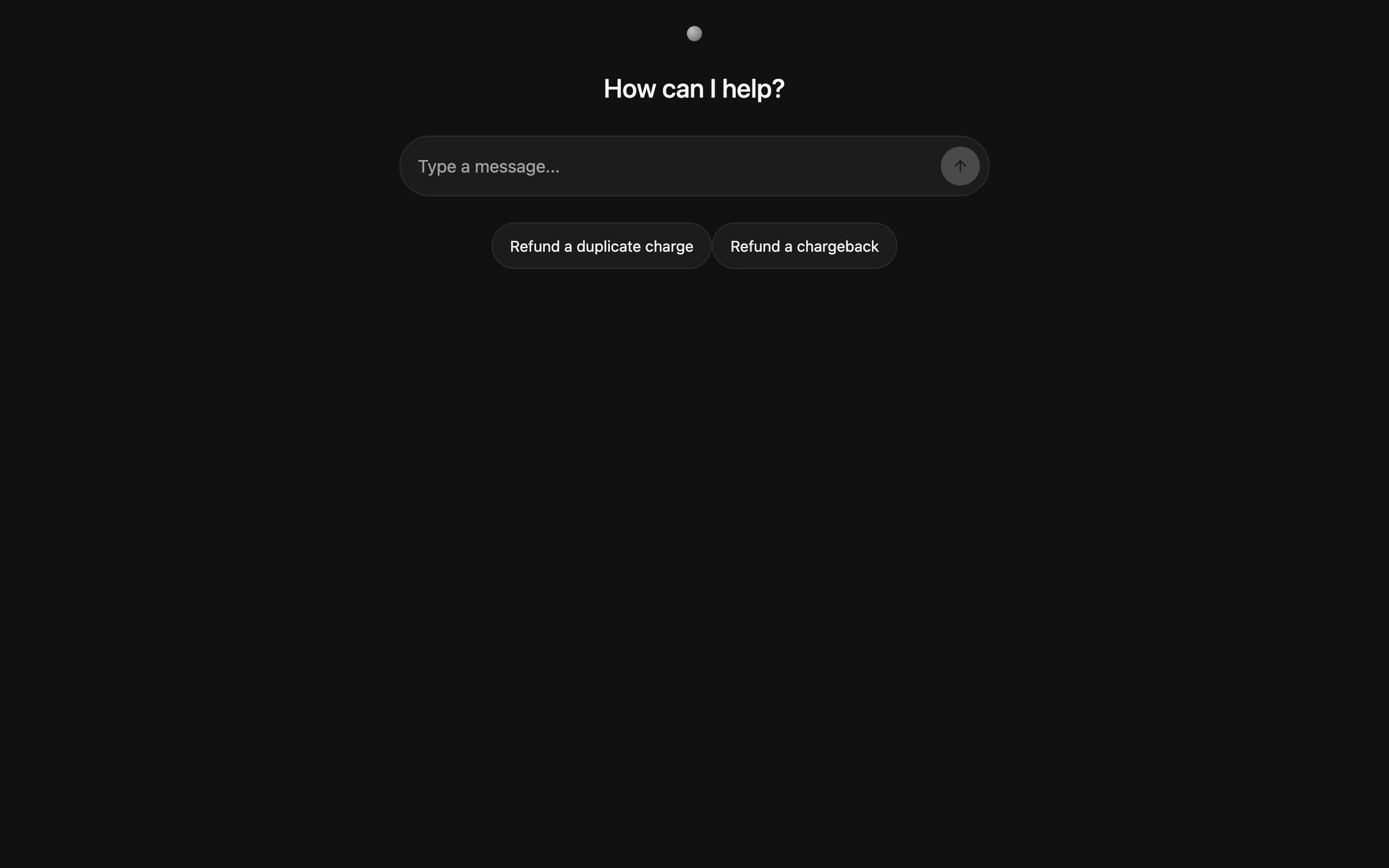
  { label: 'Refund a duplicate charge', value: 'Refund $47.50 to customer cus_a8x2k — they were charged twice for the same order.' },
  { label: 'Refund a chargeback', value: 'Refund $129.00 to customer cus_z19fp who opened a chargeback for unrecognized activity.' },
] as const;

/**
 * Refund authorization cockpit example.
 *
 * The LangGraph backend acknowledges the refund draft, then pauses at
 * `request_approval` with a structured interrupt payload of the form
 * `{ kind: 'refund_approval', amount, customer_id, reason }`.
 *
 * The frontend uses `ChatApprovalCardComponent` to render the native-dialog
 * modal and emit a `ChatApprovalAction` ('approve' | 'edit' | 'cancel').
 * The handler maps each action to a structured resume payload back to the
 * graph.
 *
 * The agent is wired in `app.config.ts` via `provideAgent({...})` and
 * retrieved here with `injectAgent()`.
 */
@Component({
  selector: 'app-interrupts',
  standalone: true,
  imports: [
    ChatComponent,
    ChatApprovalCardComponent,
    ChatWelcomeSuggestionComponent,
    ExampleChatLayoutComponent,
    CurrencyPipe,
  ],
  changeDetection: ChangeDetectionStrategy.OnPush,
  template: `
    <example-chat-layout>
      <div main class="flex flex-col h-full">
        <chat [agent]="agent" class="flex-1 min-w-0">
          <div chatWelcomeSuggestions>
            @for (s of suggestions; track s.value) {
              <chat-welcome-suggestion
                [label]="s.label"
                [value]="s.value"
                (selected)="send($event)"
              />
            }
          </div>
        </chat>

        <chat-approval-card
          [agent]="agent"
          matchKind="refund_approval"
          title="Refund approval required"
          [showEdit]="true"
          (action)="onAction($event)"
        >
          <ng-template #body let-payload>
            <div style="display:flex; flex-direction:column; gap:6px;">
              <div><span style="color:var(--tplane-chat-text-muted); margin-right:6px;">Amount</span><strong>{{ payload.amount | currency }}</strong></div>
              <div><span style="color:var(--tplane-chat-text-muted); margin-right:6px;">Customer</span><code>{{ payload.customer_id }}</code></div>
              @if (payload.reason) {
                <div style="font-style:italic; color:var(--tplane-chat-text-muted); margin-top:4px;">{{ payload.reason }}</div>
              }
              @if (editing()) {
                <div style="margin-top:10px; display:flex; gap:6px; align-items:center;">
                  <label style="color:var(--tplane-chat-text-muted); font-size:12px;">Edit amount</label>
                  <input type="number" step="0.01" [value]="editAmount() ?? payload.amount" (input)="editAmount.set(+($any($event.target).value))" style="padding:4px 8px; border:1px solid var(--tplane-chat-separator); border-radius:6px; width:120px;" />
                  <button type="button" (click)="submitEdit(payload)" style="padding:4px 10px; background:var(--tplane-chat-primary); color:var(--tplane-chat-on-primary); border:0; border-radius:6px; font-size:12px; cursor:pointer;">Save</button>
                </div>
              }
            </div>
          </ng-template>
        </chat-approval-card>
      </div>
    </example-chat-layout>
  `,
})
export class InterruptsComponent {
  protected readonly suggestions = WELCOME_SUGGESTIONS;
  protected readonly editing = signal(false);
  protected readonly editAmount = signal<number | null>(null);

  protected readonly agent = injectAgent();

  protected send(text: string): void {
    void this.agent.submit({ message: text });
  }

  protected onAction(action: ChatApprovalAction): void {
    if (action === 'approve') {
      void this.agent.submit({ resume: { approved: true } });
      this.resetEdit();
    } else if (action === 'cancel') {
      void this.agent.submit({ resume: { approved: false } });
      this.resetEdit();
    } else if (action === 'edit') {
      this.editing.set(true);
    }
  }

  protected submitEdit(payload: { amount: number }): void {
    const next = this.editAmount() ?? payload.amount;
    void this.agent.submit({ resume: { approved: true, amount: next } });
    this.resetEdit();
  }

  private resetEdit(): void {
    this.editing.set(false);
    this.editAmount.set(null);
  }
}
This is the same file as cockpit/langgraph/interrupts/angular/src/app/interrupts.component.ts from the LangGraph post — byte-identical except for the injectAgent import. The template binds <chat-approval-card matchKind="refund_approval"> to the agent. When agent.interrupt() becomes non-undefined, the dialog opens. The (action) event fires 'approve' | 'edit' | 'cancel'; the handler calls agent.submit({ resume: { approved, amount? } }). The { approved, amount? } shape couples back to whatever the LangGraph node will read from Command(resume=…) — keep them in sync.
The matchKind input is the discriminator pattern that keeps the dialog component reusable across interrupt kinds. If your graph emits interrupt({ kind: 'deploy_approval', … }), a separate <chat-approval-card matchKind="deploy_approval"> instance picks that up — same component, different match.
Walk the run
Streaming start → the draft
The user clicks "Refund a duplicate charge." A run starts; token-level TEXT_MESSAGE_CONTENT events stream the assistant's draft and messages() updates incrementally. For more on the AG-UI streaming model, see Build Fullstack Agentic Angular Apps Using AG-UI.
The interrupt arrives
The structured-output call finishes, the graph hits request_approval, and interrupt({ kind: 'refund_approval', … }) fires. ag-ui-langgraph emits the CUSTOM event on the SSE stream:
// AG-UI event on the wire
{
  "type": "CUSTOM",
  "name": "on_interrupt",
  "value": "{\"kind\":\"refund_approval\",\"amount\":99.0,\"customer_id\":\"cus_a8x2k\",\"reason\":\"Duplicate charge on 2024-12-01.\"}"
}
value is a JSON string — that's the dump_json_safe quirk. The @threadplane/ag-ui reducer parses it and sets:
agent.interrupt() // → { id: 'r3w…', value: { kind, amount, customer_id, reason }, resumable: true }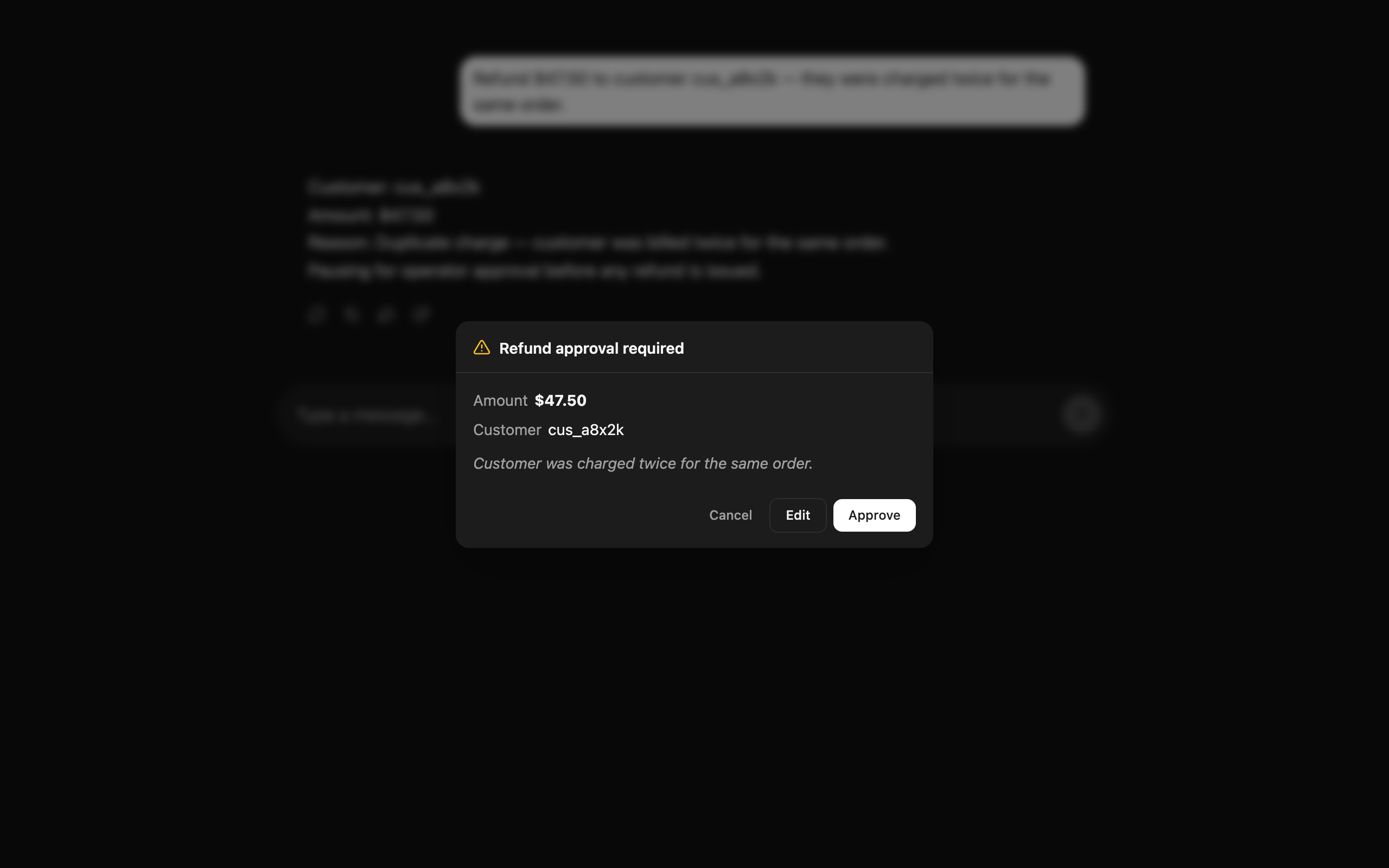
<chat-approval-card matchKind="refund_approval"> is bound to agent.interrupt(). The moment the signal becomes non-undefined, the dialog opens with the structured payload. The run has already finished (RUN_FINISHED arrived); the graph is parked at its checkpoint until something resumes it.
Approve, edit, or cancel → resume
When the operator clicks Approve:
this.agent.submit({ resume: { approved: true, amount: this.editAmount() ?? payload.amount } });The adapter clears agent.interrupt() immediately for snappy UX, then forwards the resume:
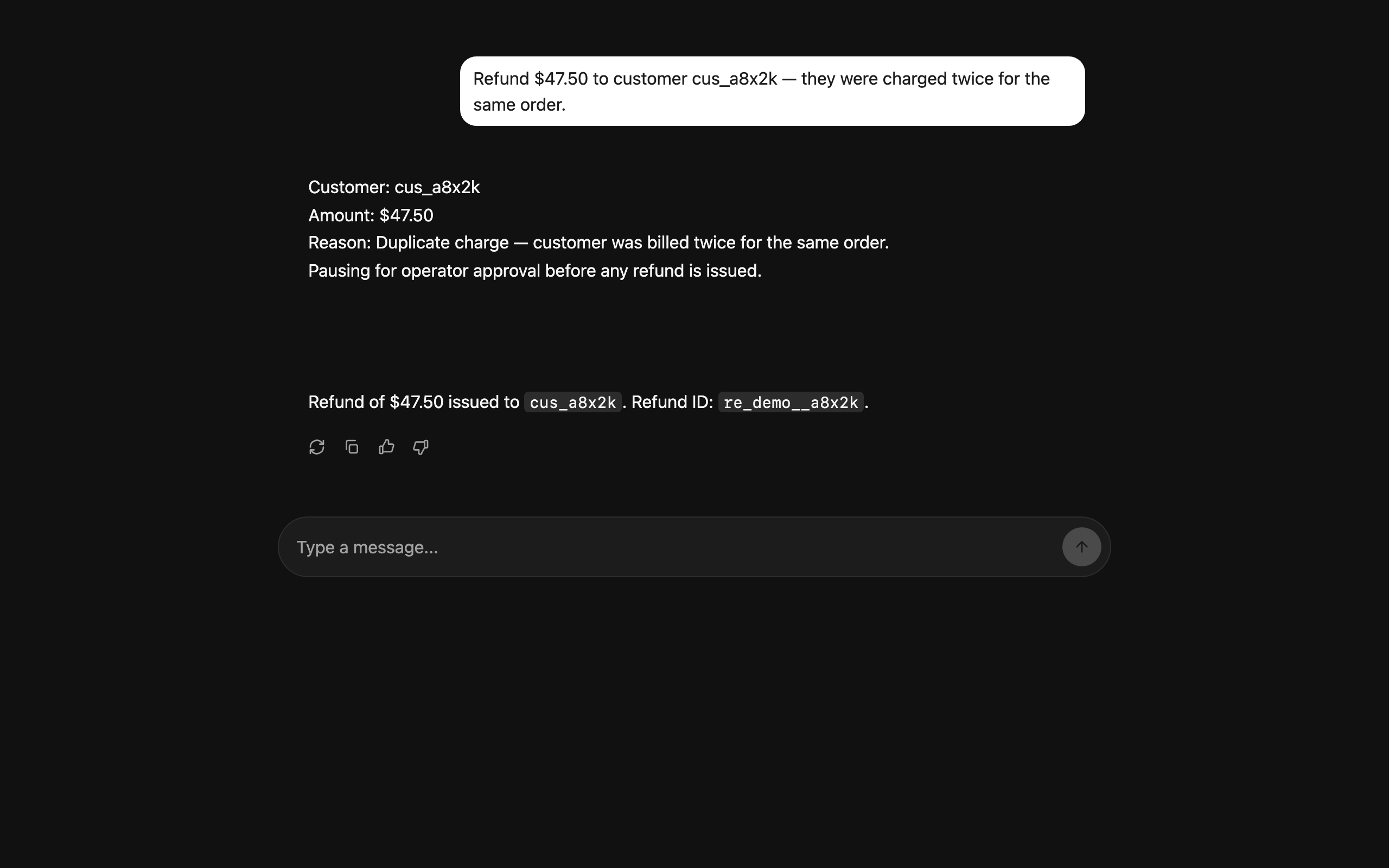
source.runAgent({ forwardedProps: { command: { resume: { approved: true, amount: 99 } } } });A new POST /agent request fires. ag-ui-langgraph reads forwarded_props.command.resume, constructs a Command(resume=…), and continues the graph from the checkpoint. Token-level streaming resumes; the assistant confirms the refund issued. Reject ({ approved: false }) takes the alternate branch in the graph; edit-then-approve carries a new amount through Command(resume=…).
On the langgraph adapter the same submit({ resume }) becomes a native Client.submit(thread, command={resume:…}) call. Different wire, same Angular surface.
Closing
The runtime-neutral Agent contract isn't a marketing line; it's the reason this post existed without rewriting the component. <chat-approval-card>, agent.interrupt(), and submit({ resume }) are the stable surface. on_interrupt and forwardedProps.command.resume are the AG-UI-specific wire details the adapter hides. Pick the adapter that matches your backend — LangGraph SDK direct → @threadplane/langgraph; anything AG-UI-fronted, including LangGraph-via-ag-ui-langgraph → @threadplane/ag-ui. Your chat surface doesn't pick.
Pointers:
- The working example:
cockpit/ag-ui/interrupts— Angular + Python, e2e-tested. - The cross-adapter parity rendered in docs: Choosing an adapter.
- The AG-UI interrupts guide for protocol-level detail: /docs/ag-ui/guides/interrupts.
- The langgraph counterpart, if you want both sides side-by-side: Human-in-the-Loop LangGraph Agents in Angular.